本文主要是讲双栈公网IPv4和IPv6以及配合域名解析双栈IPv4和IPv6,通过端口映射(NAT+NAT66)的方式直接访问内网服务。
1、环境介绍
1.1 RouterOS版本:7.20.8 long-term(未加载基础配置)
1.2 宽带:pppoe拨号+SLACC获取IPv6
1.3 域名:test.77bx.com(解析A和AAAA)
1.4 服务器:RouterOS web,群晖,ESXi等多服务器
2、公网配置
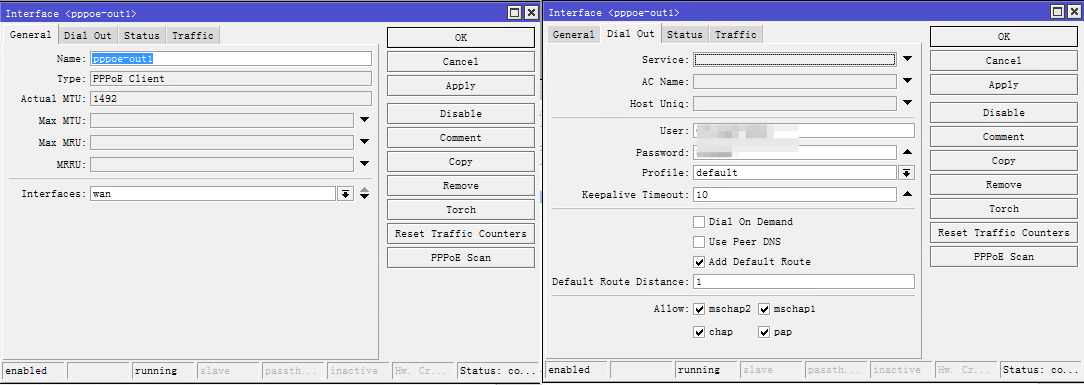
2.1 PPPoE Client拨号设置,使用WinBox连接到RouterOS,PPP ⇒ Interface选项卡 ⇒ + ⇒ PPPoE Client,General选项卡 Name:pppoe-out1,Interfaces:wan,Dial Out选项卡 User:宽带账号,Password:宽带密码,其他的默认即可。
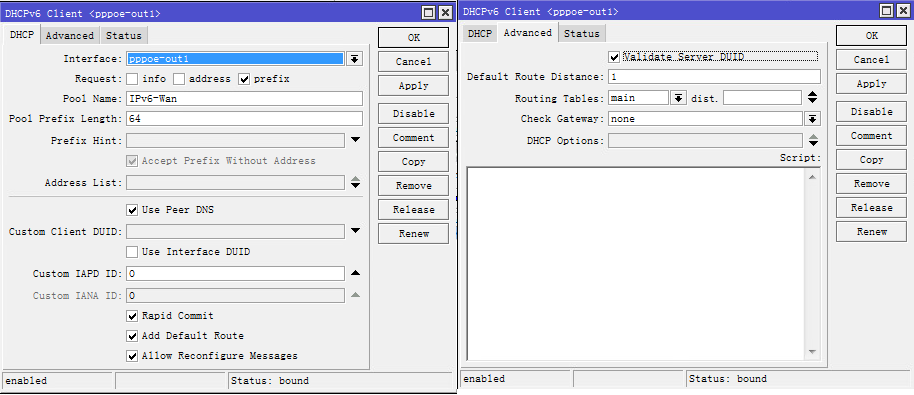
2.2 IPv6设置,IPv6 ⇒ DHCP Client ⇒ DHCP Client选项卡 ⇒ +,DHCP选项卡 Interface:pppoe-out1,Request:prefix,Pool Name:IPv6-Wan,勾选Use Peer DNS,勾选Add Default Route,Advanced选项卡 勾选Validate Server DUID(解决Bad Server DUID),其他的默认即可。
2.3 设置命令
# pppoe拨号设置
/interface pppoe-client add add-default-route=yes interface=Wan name=pppoe-out1 user=宽带账号 password=宽带密码
# IPv6获取
/ipv6 dhcp-client add add-default-route=yes interface=pppoe-out1 pool-name=IPv6-Wan request=prefix validate-server-duid=yes
3、Bridge设置
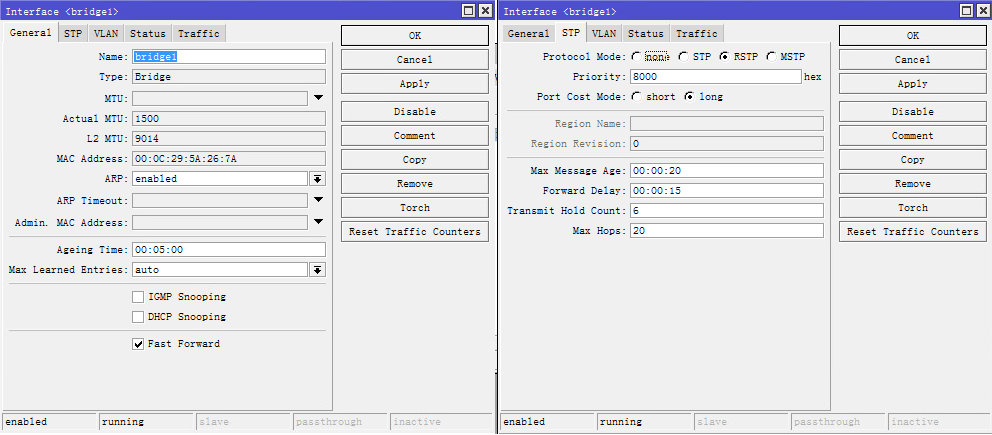
3.1 Bridge设置,Bridge ⇒ Bridge选项卡 ⇒ +,General选项卡 Name:bridge1,其他的默认即可。
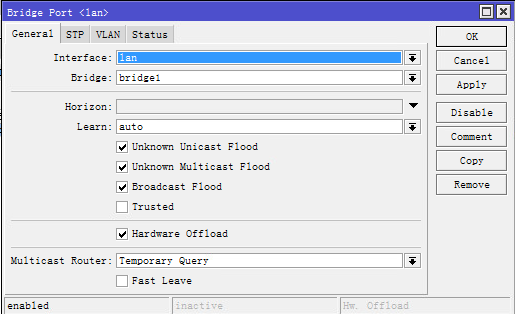
3.2 Ports设置,Bridge ⇒ Ports选项卡 ⇒ +,General选项卡 Interface:lan,Bridge:bridge1,其他的默认即可。
3.3 设置命令
# bridge设置
/interface bridge add name=bridge1
# bridge Port绑定
/interface bridge port add bridge=bridge1 interface=lan
4、IPv4内网设置
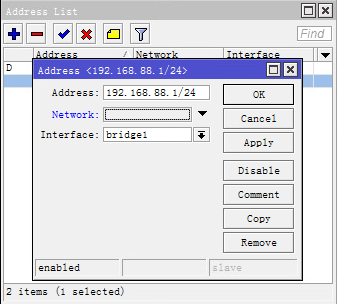
4.1 内网IPv4网关设置,IP ⇒ Address ⇒ + ,Address:192.168.88.1/24,Interface:bridge1
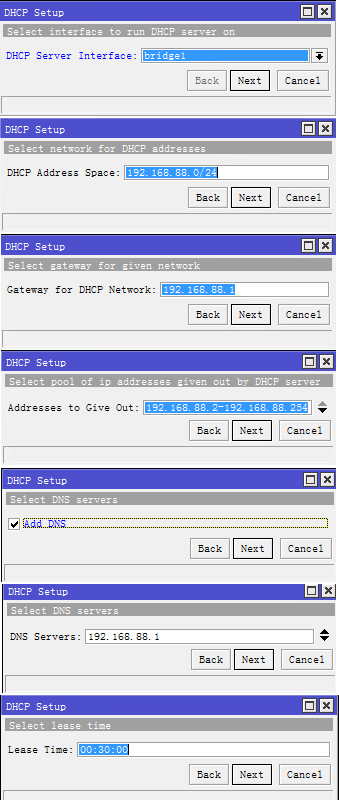
4.2 内网IPv4 DHCP设置,IP ⇒ DHCP Server ⇒ DHCP选项卡 ⇒ DHCP Setup,DHCP Server Interface:bridge1,Next,DHCP Address Space:192.168.88.0/24,Next,Gateway for DHCP Network:192.168.88.1,Next,Address to Give Out:192.168.88.2-192.168.88.254,Next,勾选Add DNS,Next,DNS Server:192.168.88.1,Next,Lease Time:00:30:00,Next,点击OK
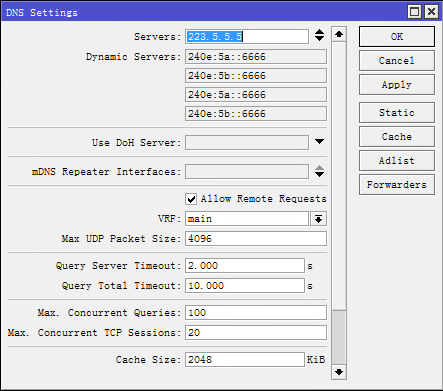
4.3 DNS设置,IP ⇒ DNS,Servers:223.5.5.5,勾选Allow Remote Requests
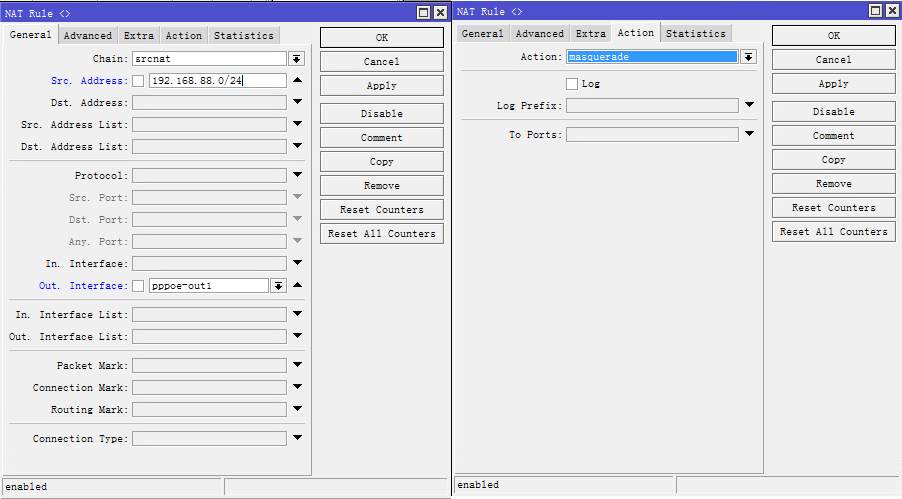
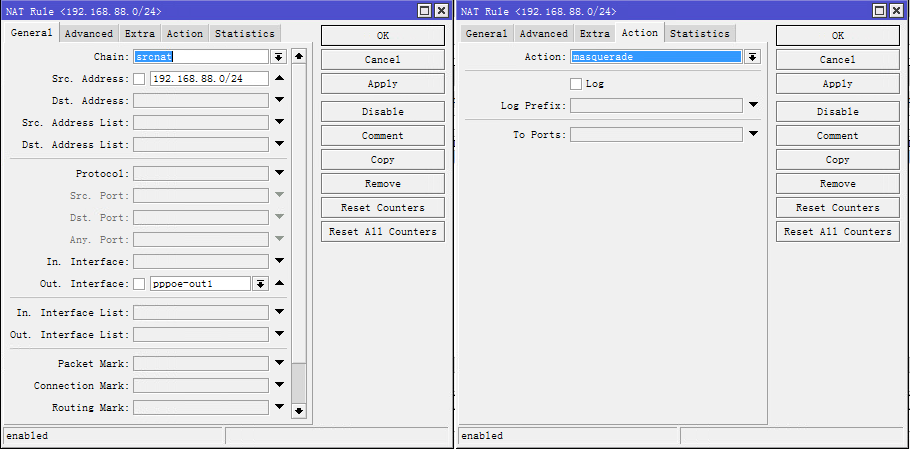
4.4 NAT Masquaerade伪装上网,IP ⇒ Firewall ⇒ NAT选项卡 ⇒ +,General选项卡 Chain:srcnat,Src. Address:192.168.88.0/24,Out. Interface:pppoe-out1,Action选项卡 Action:masquerade,其他的默认即可。
4.5 设置命令
# routeors内网IPv4
/ip address add address=192.168.88.1/24 interface=bridge1 network=192.168.88.0
# IPv4 DHCP
/ip pool add name=dhcp_pool0 ranges=192.168.88.2-192.168.88.254
/ip dhcp-server add address-pool=DHCP-WJ authoritative=after-2sec-delay interface=bridge1 name=dhcp1
/ip dhcp-server network add address=192.168.88.0/24 dns-server=192.168.88.1 gateway=192.168.88.1
# DNS设置
/ip dns set allow-remote-requests=yes servers=223.5.5.5
5、IPv6内网设置
5.1 IPv6配置公网IP,IPv6 ⇒ Address ⇒ +,Address:::1/64,From Pool:ipv6-wan,Interface:bridge1,Advertise勾选的话给内网分配IPv6地址,不勾选的话不分配,看自己的需求。
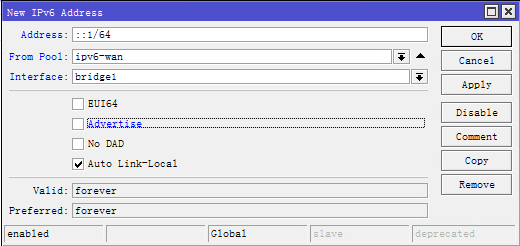
5.2 内网IPv6设置,IPv6 ⇒ Address ⇒ +,Address:fd00::1/64,Interface:bridge1,Advertise:如上面不勾选,这边建议勾选给内网分配内网IPv6地址,如果上面勾选了这边就不勾选,如果都不勾选,内网不分配IPv6地址(可以使用定IPv6地址)
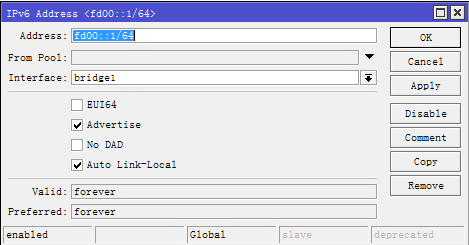
5.3 配置命令
# 公网IPv6
/ipv6 address add interface=bridge1 address=::1/64 advertise=no from-pool=ipv6-wan
# 内网IPv6
/ipv6 address add interface=bridge1 address=fd00::1/64 advertise=yes
6、IPv4 NAT设置
6.1 NAT上网,IP ⇒ Firewall ⇒ NAT选项卡 ⇒ +,General选项卡 Chain:srcnat, Src. Address:192.168.88.0/24,Out. Interface:pppoe-out1,Action选项卡 Action:masquerade,到此可以IPv4上网了。
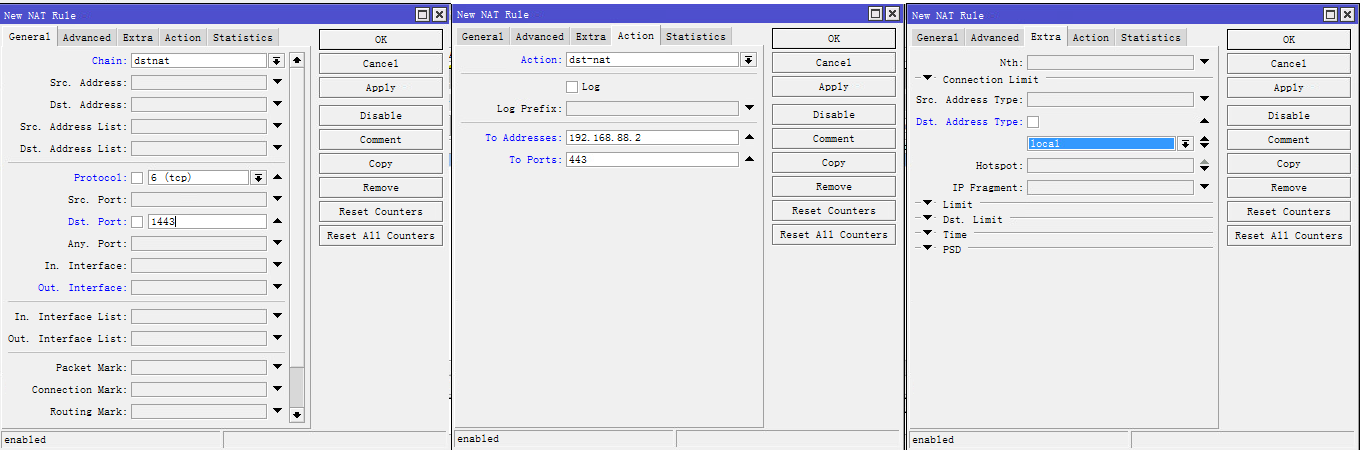
6.2 端口映射,IP ⇒ Firewall ⇒ NAT选项卡 ⇒ +,General选项卡 Chain:dstnat,Protocol:6(tcp),Dst. Port:1443,Action选项卡 Action:dst-nat,To Addresses:192.168.88.2,To Ports:443,Extra选项卡 Dst. Address Type:local
6.3 回流设置,IP ⇒ Firewall ⇒ NAT选项卡 ⇒ +,General选项卡 Chain:srcnat,Src. Address:192.168.88.0/24,Dst. Address:192.168.88.0/24,Out. Interface:bridge1,Action选项卡 Action:masquerade
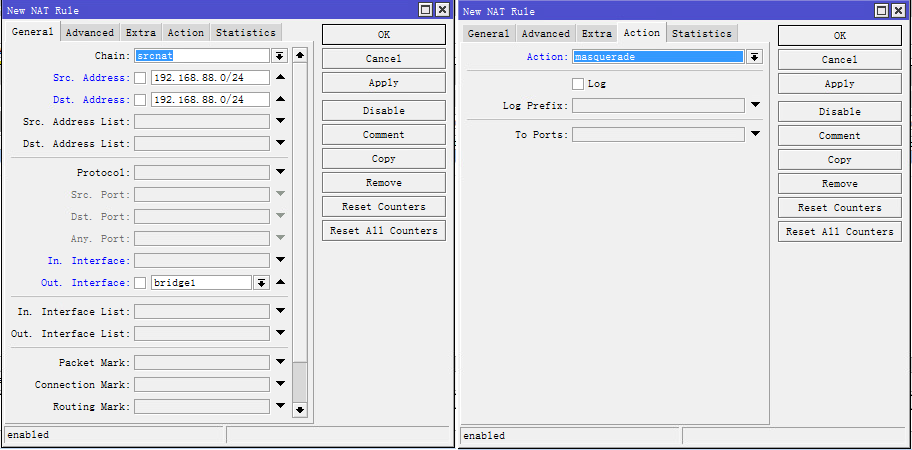
6.4 配置命令
# 上网NAT
/ip firewall nat add action=masquerade chain=srcnat out-interface=pppoe-out1 src-address=192.168.88.0/24
# 回流NAT
/ip firewall nat add action=masquerade chain=srcnat src-address=192.168.88.0/24 dst-address=192.168.88.0/24 out-interface=bridge1
# 端口映射
/ip firewall nat add action=dst-nat chain=dstnat dst-address-type=local dst-port=1443 protocol=tcp to-addresses=192.168.88.2
7、IPv6 NAT66设置
7.1 NAT66上网,IPv6 ⇒ Firewall ⇒ NAT选项卡 ⇒ +,General选项卡 Chain:srcnat, Src. Address:fd00::/24,Out. Interface:pppoe-out1,Action选项卡 Action:masquerade,到此可以IPv6上网了。
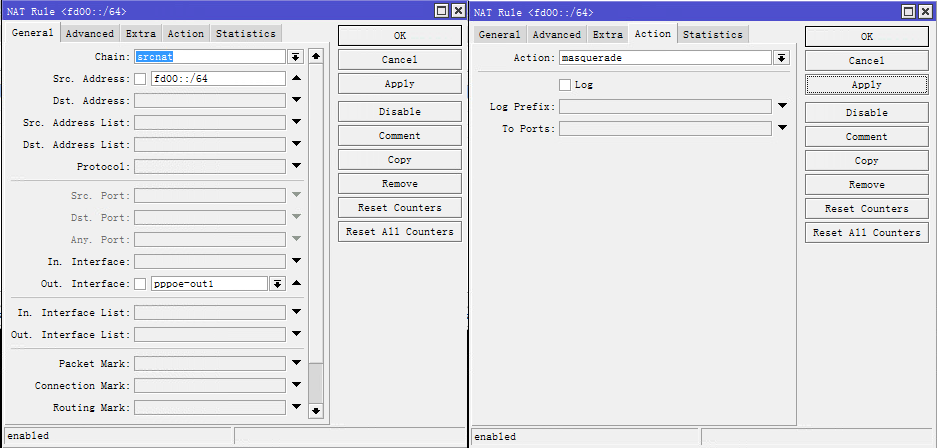
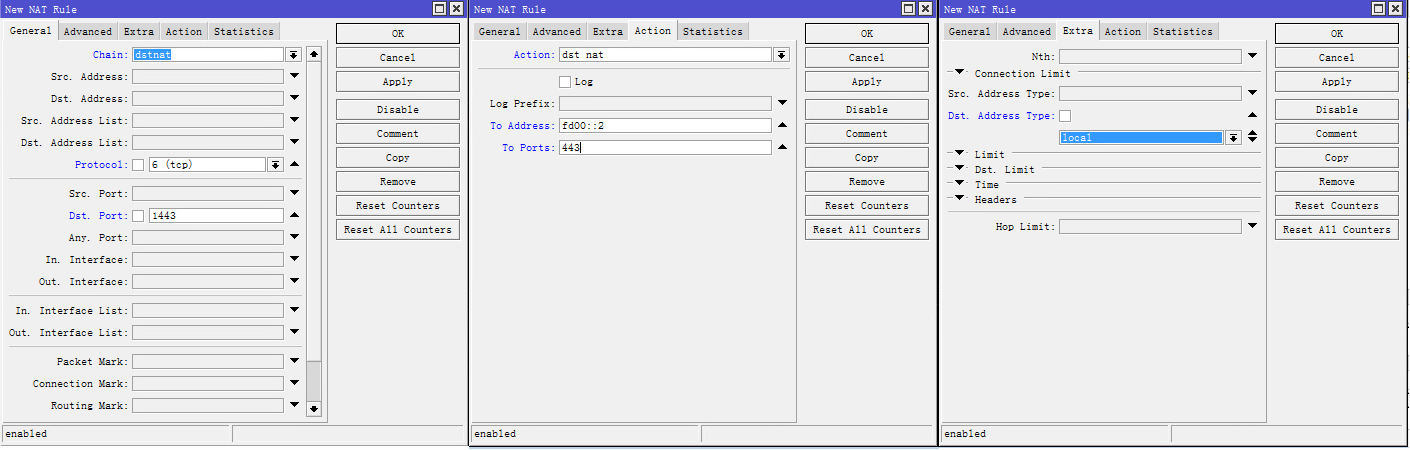
7.2 端口映射,IPv6 ⇒ Firewall ⇒ NAT选项卡 ⇒ +,General选项卡 Chain:dstnat,Protocol:6(tcp),Dst. Port:1443,Action选项卡 Action:dst-nat,To Addresses:fd00::2,To Ports:443,Extra选项卡 Dst. Address Type:local
7.3 回流设置,IPv6 ⇒ Firewall ⇒ NAT选项卡 ⇒ +,General选项卡 Chain:srcnat,Dst. Address:fd00::/64,Out. Interface:bridge1,Action选项卡 Action:masquerade
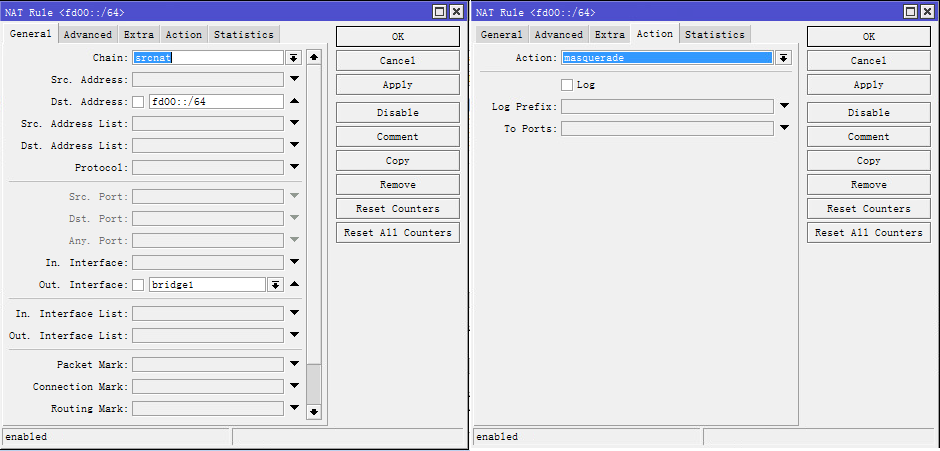
7.4 配置命令
# 上网NAT
/ipv6 firewall nat add action=masquerade chain=srcnat out-interface=pppoe-out1 src-address=fd00::/64
# 回流NAT
/ipv6 firewall nat add action=masquerade chain=srcnat dst-address=fd00::/64 out-interface=bridge1
# 端口映射
/ipv6 firewall nat add action=dst-nat chain=dstnat dst-address-type=local dst-port=1443 protocol=tcp to-addresses=fd00::2
8、域名DDNS
8.1 DDNS IPv4脚本,System ⇒ Scripts ⇒ +,Name:ddns4,Source填入以下内容:
#PPPoE
:local pppoe "pppoe-out1"

#DDNS域名(以下请改成自己的腾讯云Key,域名请先自己创建好,A和AAAA记录)
:local subdomain "test"
:local domain "77bx.com"
:local id "腾讯云API密钥SecretId"
:local key "腾讯云API密钥SecretKey"

#以下非专业人士请勿修改
:global ip4old
:local ip4new [/ip address get [/ip address find interface=$pppoe] address]
:set ip4new [:pick $ip4new 0 ([len $ip4new] -3)]
:if ($ip4new != $ip4old ) do={
  :local postdata "id=$id&key=$key&domain=$domain&record=$subdomain&ip=$ip4new&type=A"
  :local response [/tool fetch http-method="post" url=http://api.77bx.com/dnspod/dnspod.php http-data=$postdata as-value output=user]
  :if ($response->"data" = "0") do={
    :set ip4old $ip4new
    :log info "DDNS IPv4: changed $ip4old to $ip4new"
  }
}
8.2 DDNS IPv6脚本,System ⇒ Scripts ⇒ +,Name:ddns6,Source填入以下内容:
#PPPoE
:local pppoe "ipv6-wan"

#DDNS域名(以下请改成自己的腾讯云Key,域名请先自己创建好,A和AAAA记录)
:local subdomain "test"
:local domain "77bx.com"
:local id "腾讯云API密钥SecretId"
:local key "腾讯云API密钥SecretKey"

#以下非专业人士请勿修改
:global ip6old
:local ip6new [/ipv6 address get [/ipv6 address find from-pool=$pppoe] address]
:set ip6new [:pick $ip6new 0 ([len $ip6new] -3)]
:if ($ip6new != $ip6old ) do={
  :local postdata "id=$id&key=$key&domain=$domain&record=$subdomain&ip=$ip4new&type=AAAA"
  :local response [/tool fetch http-method="post" url=http://api.77bx.com/dnspod/dnspod.php http-data=$postdata as-value output=user]
  :if ($response->"data" = "0") do={
    :set ip6old $ip6new
    :log info "DDNS IPv6: changed $ip6old to $ip6new"
  }
}
8.3 定时运行脚本,System ⇒ Scheduler ⇒ +,Name:DDNS,Start Time:startup,Interval:00:01:00,On Event填入以下内容:
:execute script="ddns4"
:execute script="ddns6"
至此可以使用域名https://test.77bx.com:1443访问内网了,如果有IPv6的网络,优先IPv6。