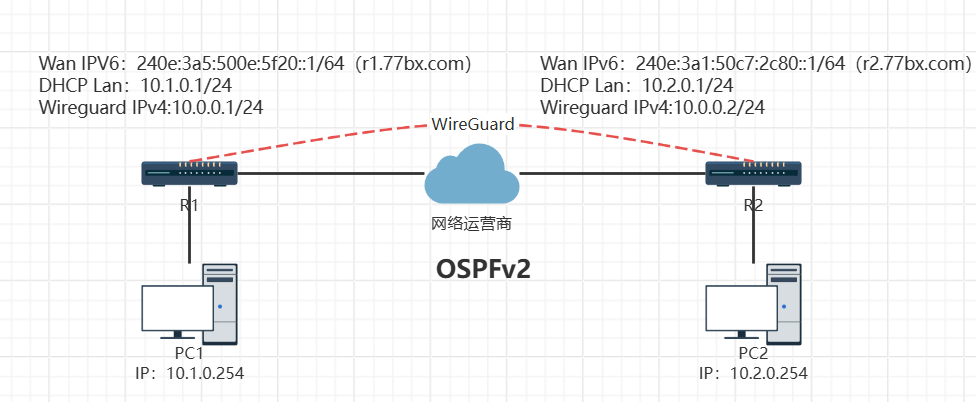
本文主要是讲基于公网IPv6(公网IPv4被回收,内网IPv4)配合WireGuard实现OSPF异地组网。
1、环境介绍
1.1 RouterOS版本:7.20.8 long-term,R1和R2
1.2 宽带:pppoe拨号+SLACC获取IPv6
1.3 域名:r1.77bx.com(解析AAAA)和r2.77bx.com(解析AAAA)
2、基础配置
这边就直接贴一下代码,会加上注释。有什么不懂可以看看我以前的文章。
2.1 R1的基础配置命令
# 配置RouterOS名称
/system identity set name=R1

# 配置bridge桥接网卡
/interface bridge add add-dhcp-option82=yes dhcp-snooping=yes igmp-snooping=yes name=Bridge-Lan-R1
/ip address add address=10.1.0.1/24 interface=Bridge-Lan-R1 network=10.1.0.0

# 配置ether1和ether2网卡进入Bridge桥接
/interface bridge port add bridge=Bridge-Lan-R1 interface=ether1 internal-path-cost=10 path-cost=10 trusted=yes
/interface bridge port add bridge=Bridge-Lan-R1 interface=ether2 internal-path-cost=10 path-cost=10 trusted=yes

# 配置pppoe拨号,账号密码改成自己的
/interface pppoe-client add add-default-route=yes default-route-distance=64 disabled=no interface=ether4 name=pppoe-out1 user=77bx password=77bx

# 配置DNS服务器
/ip dns set allow-remote-requests=yes servers=223.6.6.6,8.8.8.8,2400:3200:baba::1 verify-doh-cert=yes

# 配置DHCP服务器
/ip pool add name=DHCP-R1 ranges=10.1.0.2-10.1.0.254
/ip dhcp-server add address-pool=DHCP-R1 authoritative=after-2sec-delay interface=Bridge-Lan-R1 lease-time=1d name=DHCP-R1
/ip dhcp-server network add address=10.1.0.0/24 dns-server=10.1.0.1,223.6.6.6 gateway=10.1.0.1

# 配置masquerade伪装
/ip firewall nat add action=masquerade chain=srcnat comment="NAT Masquerade" out-interface=pppoe-out1

# 配置IPv6
/ipv6 settings set accept-router-advertisements=yes max-neighbor-entries=8192 soft-max-neighbor-entries=8191
/ipv6 dhcp-client add add-default-route=yes allow-reconfigure=yes custom-iana-id=0 custom-iapd-id=0 default-route-tables=main interface=pppoe-out1 pool-name=DHCPv6-R1 request=prefix
/ipv6 address add address=::1 from-pool=DHCPv6-R1 interface=Bridge-Lan-R1

# 变更IPv6 MTU
/ipv6 firewall mangle add action=change-mss chain=forward comment="IPv6 auto MSS clamp" new-mss=clamp-to-pmtu out-interface=pppoe-out1 protocol=tcp tcp-flags=syn
2.2 R2的基础配置命令
# 配置RouterOS名称
/system identity set name=R2

# 配置bridge桥接网卡
/interface bridge add add-dhcp-option82=yes dhcp-snooping=yes igmp-snooping=yes name=Bridge-Lan-R2
/ip address add address=10.2.0.1/24 interface=Bridge-Lan-R2 network=10.2.0.0

# 配置etheR2和ether2网卡进入Bridge桥接
/interface bridge port add bridge=Bridge-Lan-R2 interface=etheR2 internal-path-cost=10 path-cost=10 trusted=yes
/interface bridge port add bridge=Bridge-Lan-R2 interface=ether2 internal-path-cost=10 path-cost=10 trusted=yes

# 配置pppoe拨号,账号密码改成自己的
/interface pppoe-client add add-default-route=yes default-route-distance=64 disabled=no interface=ether4 name=pppoe-out1 user=77bx password=77bx

# 配置DNS服务器
/ip dns set allow-remote-requests=yes servers=223.6.6.6,8.8.8.8,2400:3200:baba::1 verify-doh-cert=yes

# 配置DHCP服务器
/ip pool add name=DHCP-R2 ranges=10.2.0.2-10.2.0.254
/ip dhcp-server add address-pool=DHCP-R2 authoritative=after-2sec-delay interface=Bridge-Lan-R2 lease-time=1d name=DHCP-R2
/ip dhcp-server network add address=10.2.0.0/24 dns-server=10.2.0.1,223.6.6.6 gateway=10.2.0.1

# 配置masquerade伪装
/ip firewall nat add action=masquerade chain=srcnat comment="NAT Masquerade" out-interface=pppoe-out1

# 配置IPv6
/ipv6 settings set accept-router-advertisements=yes max-neighbor-entries=8192 soft-max-neighbor-entries=8191
/ipv6 dhcp-client add add-default-route=yes allow-reconfigure=yes custom-iana-id=0 custom-iapd-id=0 default-route-tables=main interface=pppoe-out1 pool-name=DHCPv6-R2 request=prefix
/ipv6 address add address=::1 from-pool=DHCPv6-R2 interface=Bridge-Lan-R2

# 变更IPv6 MTU
/ipv6 firewall mangle add action=change-mss chain=forward comment="IPv6 auto MSS clamp" new-mss=clamp-to-pmtu out-interface=pppoe-out1 protocol=tcp tcp-flags=syn
3、WireGuard配置
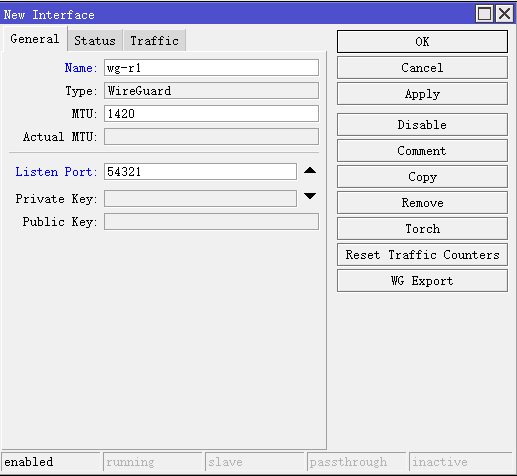
3.1 R1 WireGuard配置,WireGuard ⇒ WireGuard选项卡 ⇒ +,General选项卡 Name:wg-r1,Listen Port:54321,其他的默认。
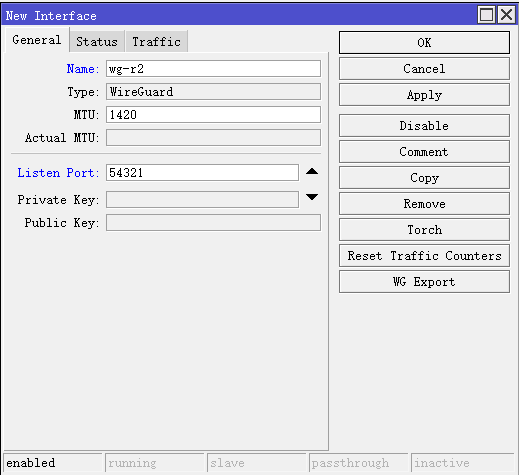
3.2 R2 WireGuard配置,WireGuard ⇒ WireGuard选项卡 ⇒ +,General选项卡 Name:wg-r2,Listen Port:54321,其他的默认。
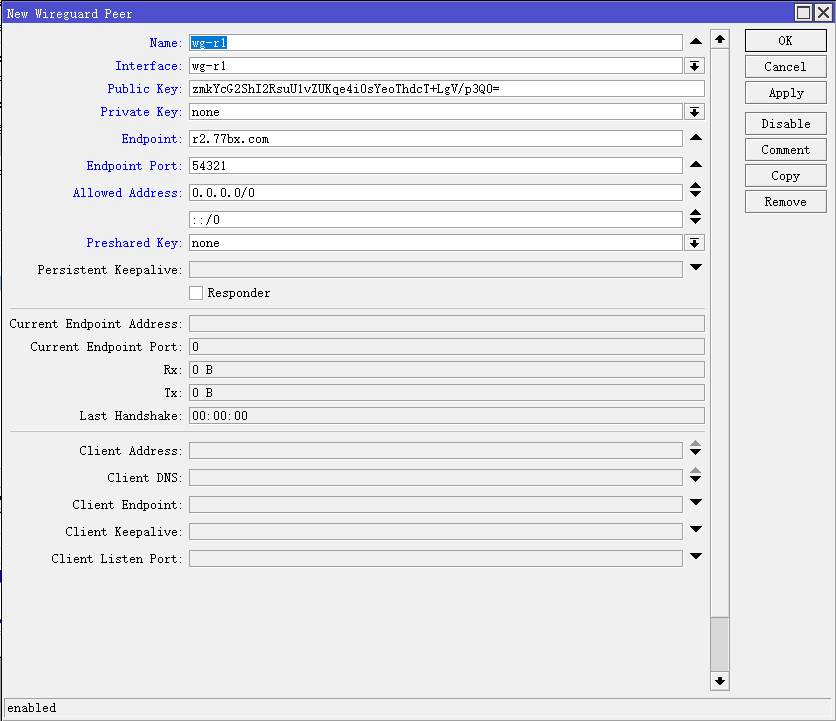
3.3 R1 Peer设置,WireGuard ⇒ Peers选项卡 ⇒ +,Name:wg-r1,Interface:wg-r1,Public Key:wg-r2 Public Key(步骤3.2创建的,点开即可看到),Private Key:none,Endpoint:r2.77bx.com(r2的ipv6公网地址),Endpoint Port:54321,Allowed Address:0.0.0.0/0和::/0,Preshared Key:none,其他的默认。
3.4 R2 Peer设置,WireGuard ⇒ Peers选项卡 ⇒ +,Name:wg-r2,Interface:wg-r2,Public Key:wg-r1 Public Key(步骤3.1创建的,点开即可看到),Private Key:none,Endpoint:r1.77bx.com(r1的ipv6公网地址),Endpoint Port:54321,Allowed Address:0.0.0.0/0和::/0,Preshared Key:none,其他的默认。
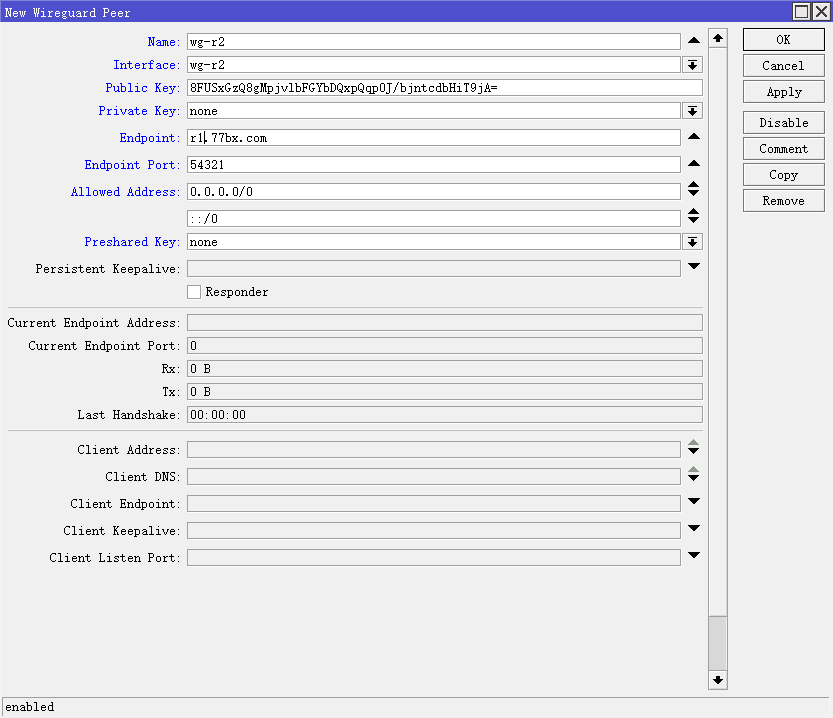
3.5 配置命令
# R1创建wireguard
/interface wireguard add listen-port=54321 mtu=1420 name=wg-r1

# R2创建wireguard
/interface wireguard add listen-port=54321 mtu=1420 name=wg-r2

# R1创建peer,其中public-key改为wg-r2的
/interface wireguard peers add allowed-address=0.0.0.0/0,::/0 endpoint-address=r2.77bx.com endpoint-port=54321 interface=wg-r1 name=wg-r1 public-key="R2 Public Key"

# R2创建peer,其中public-key改为wg-r1的
/interface wireguard peers add allowed-address=0.0.0.0/0,::/0 endpoint-address=r1.77bx.com endpoint-port=54321 interface=wg-r2 name=wg-r2 public-key="R1 Public Key"
4、OSPF设置
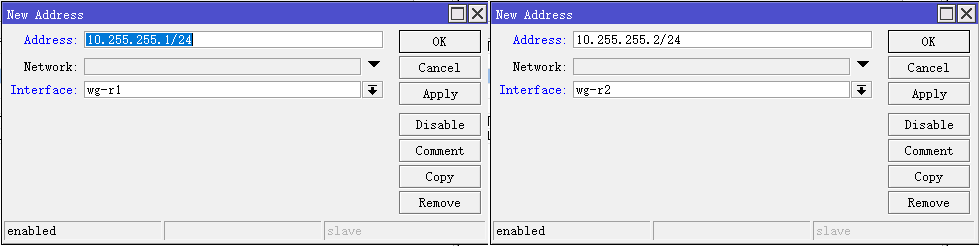
4.1 配置R1和R2的WireGuard的IPv4地址,IP ⇒ Address ⇒ + , 设置Address和Interface
R1 Address:10.255.255.1/24,Interface:wg-r1
R2 Address:10.255.255.2/24,Interface:wg-r2
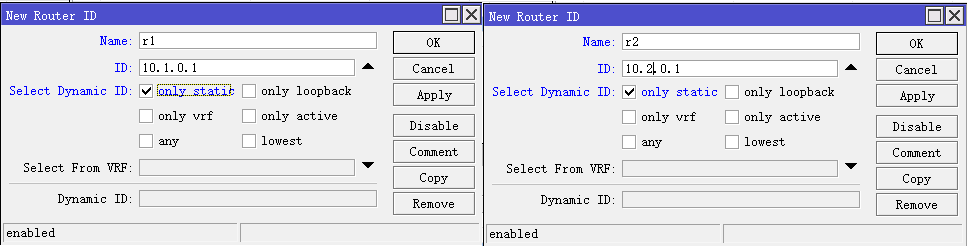
4.2 R1和R2的Router ID设置,Routing ⇒ Router ID ⇒ + ,设置Name,ID和Select Dynamic ID
R1 Name:r1,ID:10.1.0.1,Select Dynamic ID:only static
R2 Name:r2,ID:10.2.0.1,Select Dynamic ID:only static
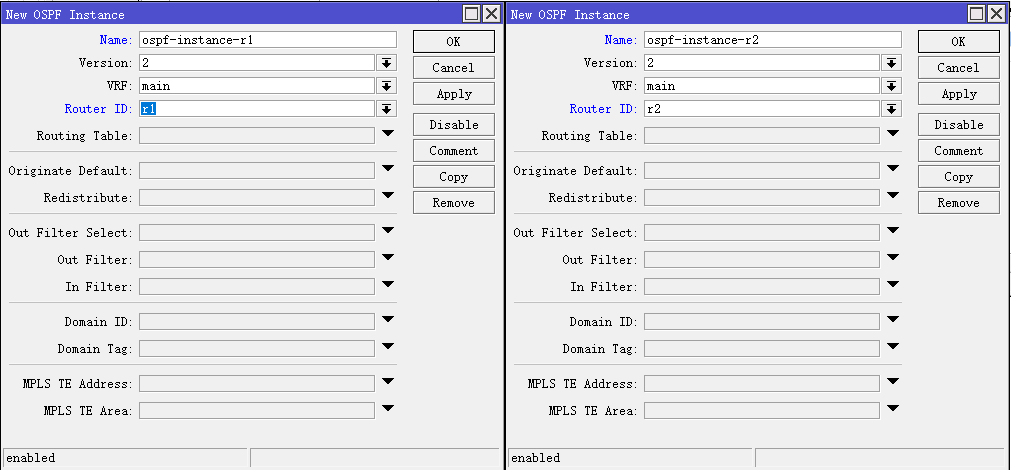
4.3 R1和R2的Instances设置。Routing ⇒ OSPF ⇒ Interfaces选项卡⇒ + ,设置Name和Router ID,其他的默认即可。
R1 Name:ospf-instance-r1,Router ID:r1
R2 Name:ospf-instance-r2,Router ID:r2
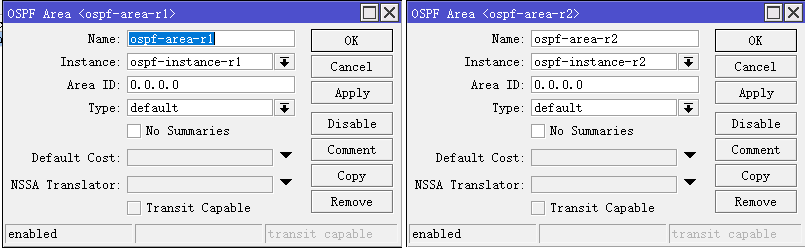
4.4 R1和R2的Areas设置。Routing ⇒ OSPF ⇒ Areas选项卡⇒ + ,设置Name、Interface和Area ID,其他的默认即可。
R1 Name:ospf-area-r1,Instance:ospf-instance-r1,Area ID:0.0.0.0
R2 Name:ospf-area-r2,Instance:ospf-instance-r2,Area ID:0.0.0.0
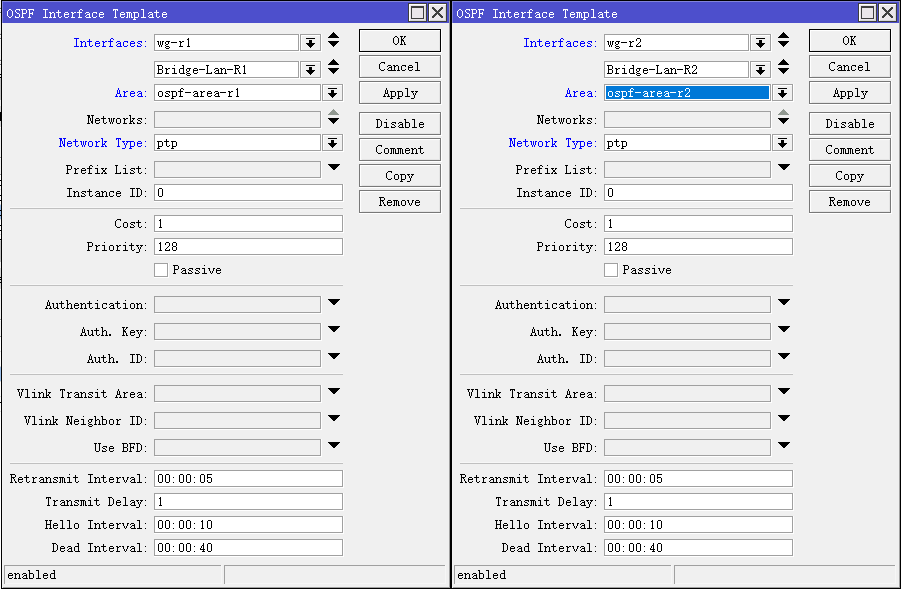
4.5 R1和R2的Interfaces Templates设置。Routing ⇒ OSPF ⇒ Interfaces Templates选项卡⇒ + ,设置Interfaces、Area和Network Type,其他的默认即可。
R1 Interface:wg-r1和Bridge-Lan-R1,Area:ospf-area-r1,Network Type:ptp
R2 Interface:wg-r2和Bridge-Lan-R2,Area:ospf-area-r2,Network Type:ptp
4.6 配置命令
# R1配置wg-r1通道ipv4地址
/ip address add address=10.255.255.1/24 interface=wg-r1

# R1配置OSPF
/routing id add disabled=no id=10.1.0.1 name=r1 select-dynamic-id=only-static
/routing ospf instance add disabled=no name=ospf-instance-r1 router-id=r1
/routing ospf area add disabled=no instance=ospf-instance-r1 name=ospf-area-r1
/routing ospf interface-template add area=ospf-area-r1 disabled=no interfaces=Bridge-Lan-R1,wg-r1 type=ptp

# R2配置wg-r2通道ipv4地址
/ip address add address=10.255.255.2/24 interface=wg-r2

# R2配置OSPF
/routing id add disabled=no id=10.2.0.1 name=r2 select-dynamic-id=only-static
/routing ospf instance add disabled=no name=ospf-instance-r2 router-id=r2
/routing ospf area add disabled=no instance=ospf-instance-r2 name=ospf-area-r2
/routing ospf interface-template add area=ospf-area-r2 disabled=no interfaces=Bridge-Lan-R2,wg-r2 type=ptp
到此R1和R2已经组网成功,可以相互访问了。